Building a Local PDF AI Assistant with Mistral, Chroma and Streamlit

September 21, 2026 · 10 min read
Working with large PDF documents can quickly become frustrating. Whether it is a technical handbook, a company specification, a legal document, or a 300-page report, finding one specific piece of information often means scrolling, searching, and trying to understand the context around the result.
What if you could simply ask the document a question?
"What are the rules regarding player registration?"
or:
"What does the document say about match postponements?"
And get an answer based only on the content of your PDF?
In this tutorial, we are going to build exactly that.
We will create a local PDF question-answering bot using:
- Mistral 7B running locally
- LangChain to connect the different components
- Hugging Face embeddings to transform text into vectors
- Chroma as our local vector database
- Streamlit to build the user interface
- PyPDF to extract the content of our PDF
The interesting part is that the entire application can run locally.
No external LLM API is required.
Let's build it.
What Are We Building?
The final application will allow us to load a PDF document and ask questions about its content.
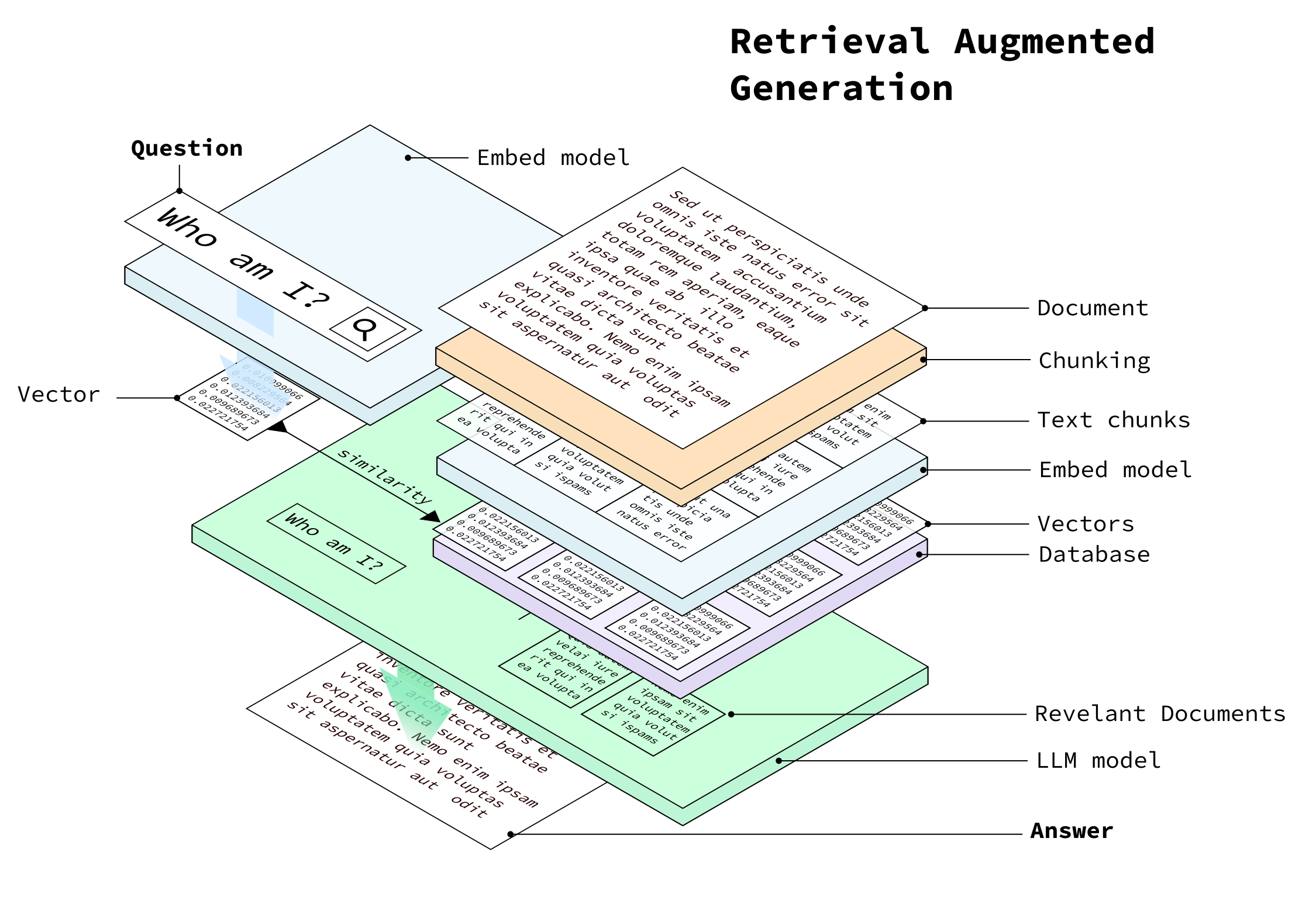
The architecture looks like this:
                  ┌─────────────────┐
                  │      PDF        │
                  │   Document      │
                  └────────┬────────┘
                           │
                           ▼
                  ┌─────────────────┐
                  │   PyPDFLoader   │
                  │ Extract text    │
                  └────────┬────────┘
                           │
                           ▼
              ┌─────────────────────────┐
              │ Recursive Text Splitter │
              │                         │
              │ PDF → smaller chunks    │
              └────────────┬────────────┘
                           │
                           ▼
              ┌─────────────────────────┐
              │ Hugging Face Embeddings │
              │                         │
              │ Text → vectors          │
              └────────────┬────────────┘
                           │
                           ▼
                  ┌─────────────────┐
                  │     Chroma      │
                  │ Vector Database │
                  └────────┬────────┘
                           │
                    User question
                           │
                           ▼
                  ┌─────────────────┐
                  │ Similarity      │
                  │ Search          │
                  └────────┬────────┘
                           │
                    Relevant chunks
                           │
                           ▼
                  ┌─────────────────┐
                  │ Mistral 7B      │
                  │ Local LLM       │
                  └────────┬────────┘
                           │
                           ▼
                  ┌─────────────────┐
                  │    Streamlit    │
                  │     Answer      │
                  └─────────────────┘
This is a classic Retrieval-Augmented Generation (RAG) architecture.
Instead of asking the LLM to know everything about the PDF, we first retrieve the relevant pieces of the document and then give those pieces to Mistral as context.
Why Use RAG for a PDF?
A large language model by itself is not a PDF search engine.
Suppose our PDF contains 200 pages.
Sending the entire document to the model for every question would be inefficient and, depending on the model's context window, may not even be possible.
RAG solves this problem by splitting the document into smaller pieces.
When the user asks a question, the application:
- Converts the question into a vector.
- Searches the vector database for similar pieces of text.
- Retrieves the most relevant chunks.
- Adds those chunks to the prompt.
- Sends the prompt to Mistral.
- Displays the generated answer.
The model therefore receives something like:
Context:
----------------
Relevant paragraph from page 42...

Relevant paragraph from page 87...

Relevant paragraph from page 91...
----------------

Question:
What are the requirements for player registration?

Answer:
The LLM doesn't need to search the entire document itself.
The vector database has already done the retrieval work.
The Technology Stack
Our application is intentionally simple.
Mistral
Mistral is our local language model.
We will use a quantized GGUF version of Mistral 7B and load it with LlamaCpp.
This means the model runs directly on our machine instead of calling a hosted LLM API.
LangChain
LangChain provides the glue between our different components.
It handles things such as:
- PDF loading
- document splitting
- embeddings
- vector retrieval
- LLM integration
Hugging Face Embeddings
Before we can search our document semantically, we need to transform the text into numerical vectors.
We will use:
sentence-transformers/all-mpnet-base-v2
Each chunk of our PDF becomes an embedding.
Questions can then be compared against those embeddings to find semantically similar text.
Chroma
Chroma is our vector database.
Instead of searching the PDF with traditional keyword matching, we search the numerical representations of the document.
This allows questions such as:
"What happens when a game is postponed?"
to potentially retrieve a passage containing different wording such as:
"Postponed fixtures shall be rescheduled..."
Streamlit
Finally, Streamlit gives us a simple web interface.
We don't need to build a React frontend or a REST API.
A few Python statements are enough to create the application.
Step 1: Create the Project
Let's start with a simple project structure:
pdf-bot/
│
├── .venv/
│
├── data/
│   └── premier-league-handbook-2026-27.pdf
│
├── chroma_db/
│
├── mistral-7b-instruct-v0.2.Q4_K_M.gguf
│
└── app.py
The data directory contains the PDF.
The GGUF file is our local Mistral model.
The chroma_db directory will contain the persistent Chroma database.
And app.py will contain our Streamlit application.
Step 2: Create the Python Environment
On macOS, we can create a virtual environment with:
python3 -m venv .venv
Activate it:
source .venv/bin/activate
Once activated, your terminal should show something similar to:
(.venv) $
Now install the required dependencies:
pip install streamlit
pip install langchain
pip install langchain-community
pip install langchain-text-splitters
pip install langchain-huggingface
pip install langchain-chroma
pip install chromadb
pip install pypdf
pip install sentence-transformers
pip install llama-cpp-python
At this point, the Python environment contains everything we need to build the application.
Step 3: Get a Local Mistral Model
Instead of calling an API, we are going to run Mistral locally.
For this example, we use a GGUF model:
mistral-7b-instruct-v0.2.Q4_K_M.gguf
Place the model at the root of the project:
pdf-bot/
├── mistral-7b-instruct-v0.2.Q4_K_M.gguf
├── app.py
└── data/
The important thing here is that LlamaCpp needs the path to the actual GGUF model file.
We configure that path in Python:
MODEL_PATH = "./mistral-7b-instruct-v0.2.Q4_K_M.gguf"
Step 4: Load the PDF
LangChain provides PyPDFLoader to extract text from PDF documents.
The basic operation is:
from langchain_community.document_loaders import PyPDFLoader

loader = PyPDFLoader(PDF_PATH)
pages = loader.load()
The PDF is converted into a collection of LangChain documents.
Each page contains both the extracted text and metadata.
For example, the metadata can contain the page number.
This becomes useful later when we want to show the user where an answer came from.
Step 5: Split the PDF Into Chunks
We don't want to store entire pages as single documents.
Instead, we divide the content into smaller chunks.
from langchain_text_splitters import RecursiveCharacterTextSplitter

text_splitter = RecursiveCharacterTextSplitter(
    chunk_size=1000,
    chunk_overlap=200,
)

documents = text_splitter.split_documents(pages)
Here we use a chunk size of approximately 1,000 characters.
We also use an overlap of 200 characters.
Why?
Imagine that an important sentence starts near the end of one chunk.
Without overlap, the next chunk could lose some of the surrounding context.
With overlap:
Chunk 1
████████████████████████████
                    ████████

                    ████████
Chunk 2
                    ███████████████████████
The overlapping area gives the retrieval system a better chance of preserving context.
The exact values are not universal.
For a different document, you may want to experiment with:
chunk_size=500
chunk_overlap=100
or:
chunk_size=1500
chunk_overlap=300
The best values depend on the structure and density of your documents.
Step 6: Convert Text Into Embeddings
Now we need to transform each text chunk into a vector.
We can use Hugging Face embeddings:
from langchain_huggingface import HuggingFaceEmbeddings

embeddings = HuggingFaceEmbeddings(
    model_name="sentence-transformers/all-mpnet-base-v2"
)
Conceptually, the process looks like this:
"Players must be registered before..."
                    │
                    ▼
             Embedding model
                    │
                    ▼
     [0.013, -0.281, 0.721, ...]
The important idea is that semantically similar pieces of text tend to have vectors that are close to one another in vector space.
This is what allows us to perform semantic search.
Step 7: Store the Embeddings in Chroma
Now we can create our vector database.
from langchain_chroma import Chroma

db = Chroma.from_documents(
    documents=documents,
    embedding=embeddings,
    persist_directory=CHROMA_PATH,
    collection_name="pdf_documents",
)
Our document pipeline now looks like:
PDF
 │
 ▼
Extract text
 │
 ▼
Split into chunks
 │
 ▼
Generate embeddings
 │
 ▼
Store vectors
 │
 ▼
Chroma
The database is persisted locally in:
./chroma_db
This is useful because we don't want to lose our vector database every time the application stops.
Step 8: Retrieve Relevant Information
Now comes the most important part of the RAG pipeline.
When the user asks:
What are the requirements for player registration?
we don't immediately send that question to Mistral.
First, we search Chroma.
retriever = db.as_retriever(
    search_kwargs={"k": 4}
)

source_documents = retriever.invoke(question)
The:
k=4
means that we ask the retriever for the four most relevant chunks.
We can then combine those chunks:
context = "\n\n".join(
    doc.page_content
    for doc in source_documents
)
Our question has now been transformed into a small, focused context extracted from the PDF.
Step 9: Build the Prompt
We now need to give Mistral both the retrieved context and the original question.
Our prompt is intentionally restrictive:
def build_prompt(context, question):
    return f"""
You are a helpful assistant answering questions about a PDF document.

Use ONLY the information contained in the provided context.

If the answer cannot be found in the context, say:
"I couldn't find the answer in the PDF."

Do not make up information.

Context:
----------------
{context}
----------------

Question:
{question}

Answer:
"""
This is an important part of the application.
We don't want Mistral to answer from its general knowledge.
We want it to behave as a question-answering interface for our document.
The instruction:
Use ONLY the information contained in the provided context.
helps constrain the model.
And:
Do not make up information.
makes our intention explicit.
It is still important to remember that prompt instructions are not a mathematical guarantee that an LLM will never hallucinate. Retrieval quality and model behavior both matter.
Step 10: Load Mistral Locally
Now we can load the GGUF model using LlamaCpp.
from langchain_community.llms import LlamaCpp

llm = LlamaCpp(
    model_path=MODEL_PATH,
    n_ctx=4096,
    max_tokens=512,
    temperature=0.1,
    verbose=False,
)
There are several parameters worth understanding.
model_path
This tells LlamaCpp where the GGUF model is located.
model_path=MODEL_PATH
n_ctx
This controls the model context window used by the application.
n_ctx=4096
Our prompt contains both the retrieved context and the question, so the context window needs to be large enough to accommodate them.
max_tokens
This controls the maximum amount of generated output.
max_tokens=512
For a document Q&A application, a few hundred tokens are often sufficient for a concise answer.
temperature
We use a low temperature:
temperature=0.1
For factual document Q&A, we generally want predictable answers rather than highly creative responses.
Step 11: Connect Everything Together
At this point, our RAG pipeline looks like this:
                         USER
                          │
                          ▼
                    Ask a question
                          │
                          ▼
                ┌──────────────────┐
                │ Embedding/Search │
                └────────┬─────────┘
                         │
                         ▼
                    Chroma DB
                         │
                         ▼
                  Top 4 PDF chunks
                         │
                         ▼
                    Build prompt
                         │
                         ▼
                   Local Mistral
                         │
                         ▼
                      Answer
This separation between retrieval and generation is what makes the application useful.
Chroma is responsible for finding information.
Mistral is responsible for generating the response.
Step 12: Build the Streamlit Interface
Now let's add a user interface.
First:
import streamlit as st
Then configure the page:
st.set_page_config(
    page_title="Mistral PDF Q&A",
    page_icon="📄",
    layout="wide",
)
And create the title:
st.title("📄 Mistral PDF Q&A")
For the question itself, we can use:
question = st.text_input(
    "Ask a question about the PDF:",
    placeholder="What is this document about?",
)
When the user enters a question, we execute the RAG pipeline.
Step 13: Put the Application Together
Here is the complete Streamlit application:
import os
import streamlit as st

from langchain_community.document_loaders import PyPDFLoader
from langchain_text_splitters import RecursiveCharacterTextSplitter
from langchain_huggingface import HuggingFaceEmbeddings
from langchain_chroma import Chroma
from langchain_community.llms import LlamaCpp


# --------------------------------------------------
# Streamlit UI
# --------------------------------------------------

st.set_page_config(
    page_title="Mistral PDF Q&A",
    page_icon="📄",
    layout="wide",
)

st.title("📄 Mistral PDF Q&A")


# --------------------------------------------------
# Configuration
# --------------------------------------------------

PDF_PATH = "./data/premier-league-handbook-2026-27.pdf"
MODEL_PATH = "./mistral-7b-instruct-v0.2.Q4_K_M.gguf"
CHROMA_PATH = "./chroma_db"


# --------------------------------------------------
# Load Mistral GGUF model
# --------------------------------------------------

@st.cache_resource
def load_llm():

    if not os.path.exists(MODEL_PATH):
        raise FileNotFoundError(
            f"Mistral model not found: {MODEL_PATH}"
        )

    llm = LlamaCpp(
        model_path=MODEL_PATH,
        n_ctx=4096,
        max_tokens=512,
        temperature=0.1,
        verbose=False,
    )

    return llm


# --------------------------------------------------
# Load embedding model
# --------------------------------------------------

@st.cache_resource
def load_embeddings():

    return HuggingFaceEmbeddings(
        model_name="sentence-transformers/all-mpnet-base-v2"
    )


# --------------------------------------------------
# Create / load Chroma vector database
# --------------------------------------------------

@st.cache_resource
def process_pdf(pdf_path):

    loader = PyPDFLoader(pdf_path)
    pages = loader.load()

    text_splitter = RecursiveCharacterTextSplitter(
        chunk_size=1000,
        chunk_overlap=200,
    )

    documents = text_splitter.split_documents(pages)

    embeddings = load_embeddings()

    db = Chroma.from_documents(
        documents=documents,
        embedding=embeddings,
        persist_directory=CHROMA_PATH,
        collection_name="pdf_documents",
    )

    return db


# --------------------------------------------------
# Build prompt
# --------------------------------------------------

def build_prompt(context, question):

    return f"""
You are a helpful assistant answering questions about a PDF document.

Use ONLY the information contained in the provided context.

If the answer cannot be found in the context, say:
"I couldn't find the answer in the PDF."

Do not make up information.

Context:
----------------
{context}
----------------

Question:
{question}

Answer:
"""


# --------------------------------------------------
# Check PDF
# --------------------------------------------------

if not os.path.exists(PDF_PATH):

    st.error(
        f"PDF not found at `{PDF_PATH}`. "
        "Please put your PDF inside the `data/` folder."
    )

    st.stop()


# --------------------------------------------------
# Load vector database
# --------------------------------------------------

with st.spinner("Loading PDF and building vector database..."):

    try:
        db = process_pdf(PDF_PATH)

    except Exception as e:

        st.error(
            f"Error processing PDF: {e}"
        )

        st.stop()


st.success("PDF loaded successfully!")


# --------------------------------------------------
# Load LLM
# --------------------------------------------------

with st.spinner("Loading Mistral model..."):

    try:
        llm = load_llm()

    except Exception as e:

        st.error(
            f"Error loading Mistral model: {e}"
        )

        st.stop()


# --------------------------------------------------
# Question input
# --------------------------------------------------

question = st.text_input(
    "Ask a question about the PDF:",
    placeholder="What is this document about?",
)


# --------------------------------------------------
# RAG pipeline
# --------------------------------------------------

if question:

    with st.spinner("Searching the PDF..."):

        retriever = db.as_retriever(
            search_kwargs={"k": 4}
        )

        source_documents = retriever.invoke(
            question
        )

    if not source_documents:

        st.warning(
            "No relevant information was found in the PDF."
        )

        st.stop()

    context = "\n\n".join(
        doc.page_content
        for doc in source_documents
    )

    prompt = build_prompt(
        context=context,
        question=question,
    )

    with st.spinner("Mistral is thinking..."):

        try:

            answer = llm.invoke(prompt)

        except Exception as e:

            st.error(
                f"Error generating answer: {e}"
            )

            st.stop()

    st.markdown("### Answer")

    st.write(answer)

    st.markdown("### Sources")

    for i, doc in enumerate(
        source_documents,
        start=1
    ):

        page_number = doc.metadata.get(
            "page",
            "unknown"
        )

        display_page = (
            page_number + 1
            if isinstance(page_number, int)
            else page_number
        )

        with st.expander(
            f"Source {i} — Page {display_page}"
        ):

            st.write(
                doc.page_content
            )
Step 14: Run the Application
On macOS, activate the virtual environment:
source .venv/bin/activate
Then start Streamlit:
streamlit run app.py
Streamlit will start a local development server.
You can then open:
http://localhost:8501
The application should display:
📄 Mistral PDF Q&A

PDF loaded successfully!

Ask a question about the PDF:
[_______________________________]

### Answer

...

### Sources

Source 1 — Page 42
Source 2 — Page 87
Source 3 — Page 91
Source 4 — Page 103
And that's it.
We have a local document chatbot.
What Actually Happens When We Ask a Question?
Let's walk through a real request.
Suppose we ask:
What happens if a fixture is postponed?
The first step is retrieval.
Chroma searches the document for chunks that are semantically related to the question.
It might return four pieces of text:
Page 42
"Postponed fixtures shall be rearranged..."

Page 43
"Clubs must agree on an alternative date..."

Page 44
"The competition authority may determine..."

Page 78
"Fixtures affected by exceptional circumstances..."
These pieces are then combined into our context.
Mistral receives the prompt and generates an answer based on that retrieved information.
Finally, Streamlit displays both the answer and the source passages.
This last part is particularly useful.
The user doesn't have to blindly trust the generated answer.
They can open the sources and inspect the original text.
Why Show the Sources?
One of the most useful features of this small application is the source display.
We already have access to metadata from the PDF:
page_number = doc.metadata.get(
    "page",
    "unknown"
)
We can therefore show:
Source 1 — Page 42
and expose the actual retrieved text:
with st.expander(
    f"Source {i} — Page {display_page}"
):
    st.write(doc.page_content)
This creates a much more transparent experience.
Instead of:
Question → AI → Answer
we have:
Question
   ↓
Retrieved evidence
   ↓
AI-generated answer
   ↓
Original sources
That distinction becomes increasingly important when building AI applications around business or technical documents.
Keeping Everything Local
One of the interesting aspects of this architecture is that the main components can run locally.
The flow is:
                 Your Computer
┌──────────────────────────────────────────────┐
│                                              │
│   PDF                                        │
│    │                                         │
│    ▼                                         │
│   Embeddings ───────► Chroma                 │
│                         │                    │
│                         ▼                    │
│                     Retrieval                │
│                         │                    │
│                         ▼                    │
│                    Mistral 7B                │
│                         │                    │
│                         ▼                    │
│                    Streamlit                 │
│                                              │
└──────────────────────────────────────────────┘
There is no need to send the document to an external LLM API for this architecture.
This can be particularly attractive for documents that you don't want to upload to a third-party service.
Of course, "local" does not automatically mean "secure". Your machine, dependencies, model files, logs, and application still need to be managed appropriately.
A Few Things to Watch Out For
Our application is intentionally simple, but there are several areas worth improving.
1. Rebuilding the Vector Database
The current implementation calls:
Chroma.from_documents(...)
when process_pdf() runs.
For a prototype this is perfectly fine.
For a larger application, however, you don't want to recreate all embeddings every time Streamlit starts.
A production-oriented implementation would:
- Calculate whether the document has changed.
- Check whether an existing Chroma collection exists.
- Reuse the existing embeddings.
- Only process new documents when necessary.
That can make startup considerably faster.
2. Chunk Size Matters
There is no perfect value for:
chunk_size=1000
A technical document may benefit from larger chunks.
A legal document might have meaningful sections that should be preserved.
A document containing tables can require a completely different strategy.
The quality of retrieval is strongly influenced by how we divide the document.
3. PDFs Are Not Always Simple Text
PDFs can contain:
- tables
- images
- scanned pages
- multiple columns
- headers and footers
- unusual layouts
A normal text extractor may not always preserve the original structure correctly.
For scanned PDFs, OCR may be necessary before embeddings can be generated.
4. Retrieval Quality Matters
The LLM is only as good as the information we retrieve.
If Chroma returns the wrong chunks, Mistral doesn't have the information required to answer the question correctly.
This is one of the most important lessons when building RAG systems:
Improving retrieval can be just as important as changing the LLM.
Increasing k is one possible experiment:
search_kwargs={"k": 6}
But more context is not automatically better.
Too many irrelevant chunks can make the prompt noisy.
Where Could We Take This Next?
The basic chatbot is only the beginning.
Once the architecture is working, there are several interesting improvements we can add.
Multiple PDFs
Instead of:
One PDF
   ↓
One Chroma collection
we could support:
PDF 1 ─┐
PDF 2 ─┤
PDF 3 ─┼──► Chroma
PDF 4 ─┘
The user could then ask questions across an entire document library.
PDF Uploads
Instead of hard-coding:
PDF_PATH = "./data/premier-league-handbook-2026-27.pdf"
Streamlit can provide a file uploader:
uploaded_file = st.file_uploader(
    "Upload a PDF",
    type="pdf"
)
This would turn our application from a single-document demo into a reusable PDF assistant.
Conversation History
Currently every question is independent.
We could introduce conversation memory so that users can ask:
What does the document say about player registration?
followed by:
What about the deadline?
The application could use the previous question and answer to understand what "the deadline" refers to.
Better Source Citations
Instead of displaying raw chunks, we could format the sources more elegantly:
Answer

Players must be registered before the applicable deadline...

Sources

📄 Page 42
📄 Page 43
📄 Page 44
We could also add a button to open the PDF at the relevant page.
Streaming Mistral Responses
Rather than waiting for the entire answer to be generated, the UI could display tokens progressively.
This would make the application feel much more responsive, especially when running a local model on CPU.
A Better Retrieval Strategy
A more advanced implementation could introduce:
- metadata filtering
- hybrid search
- reranking
- parent/child document retrieval
- query rewriting
- multiple embedding models
- retrieval evaluation
At that point, we are moving from a simple RAG prototype toward a more serious document intelligence platform.
The Architecture in One Picture
The entire application can be reduced to five major components:
┌──────────────┐
│     PDF      │
└──────┬───────┘
       │
       ▼
┌──────────────┐
│  Chunking    │
└──────┬───────┘
       │
       ▼
┌──────────────┐
│  Embeddings  │
└──────┬───────┘
       │
       ▼
┌──────────────┐
│    Chroma    │
│ Vector Store │
└──────┬───────┘
       │
       │ relevant chunks
       ▼
┌──────────────┐
│   Mistral    │
│  Local LLM   │
└──────┬───────┘
       │
       ▼
┌──────────────┐
│  Streamlit   │
│      UI      │
└──────────────┘
Each component has a clear responsibility.
PyPDF extracts the document.
The text splitter creates manageable chunks.
The embedding model converts those chunks into vectors.
Chroma finds the relevant information.
Mistral turns that information into a natural-language answer.
Streamlit makes the whole thing accessible through a browser.
Final Thoughts
Building a PDF chatbot doesn't necessarily require a large cloud architecture or an external AI API.
With a local Mistral model, a vector database, and a lightweight Streamlit interface, we can build a surprisingly capable document assistant with just Python.
The important concept is not the chatbot interface itself.
It is the pipeline behind it:
Document
   ↓
Chunk
   ↓
Embed
   ↓
Retrieve
   ↓
Generate
Once this pattern becomes familiar, it can be applied to much more than PDFs.
The same architecture can power assistants for:
- technical documentation
- internal company knowledge
- product manuals
- research papers
- compliance documents
- meeting notes
- contracts
- knowledge bases
And because the model and vector database can run locally, it provides an interesting foundation for experimenting with private, self-hosted AI applications.
The next step is no longer simply asking an LLM questions.
It is giving an LLM the right information at the right time.
That's where RAG becomes particularly powerful.
Project Structure
For reference, the final project looks like this:
pdf-bot/
│
├── .venv/
│
├── data/
│   └── premier-league-handbook-2026-27.pdf
│
├── chroma_db/
│
├── mistral-7b-instruct-v0.2.Q4_K_M.gguf
│
└── app.py
Start the application with:
source .venv/bin/activate
streamlit run app.py
Then open:
http://localhost:8501
And start talking to your PDF.
Tags:
AI · Mistral · RAG · LLM · Python · Streamlit · Chroma · Vector Database · LangChain · Machine Learning